
Words to Minutes: Convert Word Count to Speaking Time Free
Have you ever prepared a beautiful speech only to find yourself rushing through the last three slides because the timer started blinking red? As a WordPress Developer and SEO Expert, I, Waseem Aijaz, have seen many professionals struggle with presentation timing. That is exactly why I built the Speech Master Pro tool here at GetCalcBase.
Words to Minutes Silent Reading
🎙️ Words To Minutes Speech Analyzer
Write something to see pause suggestions.
This isn’t just a basic word counter. It is a high-precision analyzer designed to solve the real-world problem of speech pacing. Whether you are a student, a CEO, or a voice-over artist, this tool ensures your voice is heard at the right rhythm.
My tip is that you should mostly use the text-based input feature because it gives more accurate results. If the speech or sentence is correct, the tool works properly and provides better accuracy.
The voice feature may not always understand clearly if the pronunciation or accent is not correct. So it is better to rely on written text input. It also helps improve the speed and accuracy of results.
If the input text is clear and properly written, the tool can calculate speech speed and timing more effectively.
Troubleshooting: Common Speech Timing Problems
In my years of developing SEO and utility tools, I’ve noticed that even the best scripts need “trimming.” Here is how to solve common timing issues:
Problem: “My speech is 2 minutes over the time limit! What do I do?” The Waseem Solution: Don’t just speak faster; that ruins your E-E-A-T (Expertise). Instead, switch the tool to “Fast” mode to see if it’s doable. If not, delete “filler words” like actually, basically, or very. Our analyzer updates in real-time, so you can see the seconds drop as you edit.
This is my personal experience.
When I was a student, I had to give a speech as part of a competition. I was very nervous and lacked confidence because my speech speed was not good, and I was not sure how long my speech would take.
I did not understand how to improve my speaking timing or how to measure my speech duration properly. I searched on tools like ChatGPT, Gemini, and others, and I found a recommendation for the GCB (Get Calculator Base) website.
On this website, I used the “Word to Minutes” tool. I was surprised by its features. I could paste my speech text into the tool, and it automatically calculated the following:
Total words
Estimated speech time
Speaking speed (WPM)
Time in minutes and seconds
This helped me understand how long my speech would take and whether I needed to speed up or slow down.
The best feature I liked was that it gave a very clear and simple analysis of my speech. It even helped me improve my presentation timing and confidence.
There is also a voice feature in some tools where users can speak, and it can estimate speaking speed, which makes it even more useful for practice.
This tool really helped me improve my speech performance, and I felt more confident during my presentation.
Overall, it is a very helpful educational tool for students, teachers, and anyone who wants to improve speaking skills and timing.
How to Use Our Words to Minutes Speech Calculator
I wanted to make this tool so simple that anyone, anywhere in the world, could use it without a manual. Here is my quick guide on how to get the most out of it:
Step 1: Input Your Content: You can paste your pre-written script directly into the editor. If you haven’t written it yet, simply click the “Start Voice Input” button and speak naturally. Our tool will transcribe your words in real-time.
Step 2: Choose Your Mode: Toggle between “Speaking” for live presentations and “Silent Reading” for studying or personal prep.
Step 3: Set Your Pace: Use the slider to adjust the Words Per Minute (WPM). I’ve pre-set it to 140 WPM, which is the gold standard for professional clarity.
Step 4: Check the Sidebar: Instantly see your total time, word count, character count, and even how many A4 pages your speech would cover.
1. The “Power of Silence” Strategy
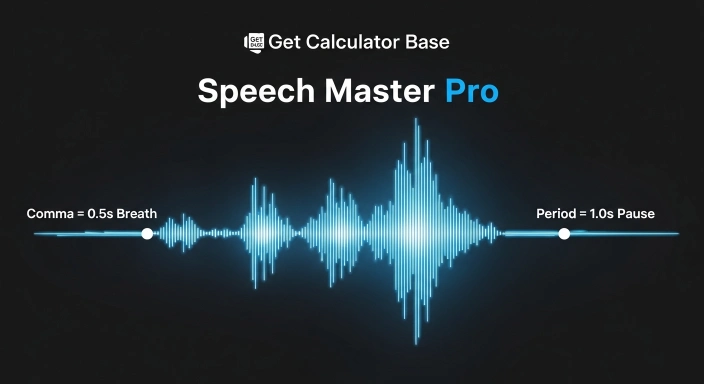
Our algorithm is sensitive to punctuation. If your script feels too “dense” or technical, I recommend adding an extra period (.) after your most important points. This signals our tool to add a 1-second buffer, reminding you to pause and let the audience digest your message. Silence is a tool—use it wisely.
2. The Slide-to-Script Ratio
If you are using visual aids like PowerPoint, aim for 150–200 words per slide. Use our tool to highlight sections of your text to see the time per slide. This prevents the “rushing” effect where you change slides faster than the audience can look at them.
Quick Reference: How Speed Affects Your Speech Timing
Knowing your natural speaking pace is the key to perfect timing. Use this reference table to see how a standard 500-word script changes based on your delivery speed:
| Speaking Pace | Words Per Minute (WPM) | 500 Words Duration |
| Slow/Formal Pace | 100 WPM | 5.0 Minutes |
| Average/Professional Pace | 130 WPM | 3.8 Minutes |
| Fast/Energetic Pace | 160 WPM | 3.1 Minutes |
Why Precision Matters: Words to Minutes Calculator for Success
In the world of Digital Marketing and Public Speaking, “approximate” isn’t good enough. If your 5-minute slot turns into 6 minutes, you look unprofessional.
Most online tools use a flat division formula. However, the GetCalcBase logic is deeper. My code includes a Pause Analysis Algorithm that accounts for every comma, period, and exclamation mark. Why? Because a comma isn’t just a mark; it’s a short breath. A period is a moment for your audience to think. By factoring these in, we provide a “Real-World Estimate” that actually matches your live performance.
The Scientific Formula Behind the Tool
We use a refined version of the standard speech-to-time ratio:
This micro-precision is why experts trust our words to minutes calculator over generic alternatives.
How to Test Words Per Minute (WPM) Like a Professional
If you don’t know your speed, don’t guess. Use the “Practice Mode” on our tool. Click the mic, read a paragraph from your script for 60 seconds, and hit stop. The “Words” box will tell you your exact WPM.
Waseem’s Pro Tip: For high-stakes business presentations in the USA or UK, aim for 110-130 WPM. It gives you an authoritative and calm tone. For energetic pitches or YouTube scripts, you can push toward 150-160 WPM.
Master the Rhythm: Understanding Syllable and Word Pacing
A common logic puzzle in linguistics is: syllable is to word as minute is to… the hour. Just as syllables build words, minutes build the impact of your hour on stage.
If you use heavy, multi-syllabic technical words (like those used in our [Scientific Notation Calculator]), you will naturally speak slower. Our tool’s pause detection helps balance this out. If your script is dense with punctuation, the tool automatically adds the necessary “buffer time” so you don’t end up gasping for air.

Mastering Your Results: An Expert Output Guide
Our analyzer provides more than just a countdown; it delivers a comprehensive script audit. Here is how to interpret the data on your sidebar to ensure a flawless delivery:
Total Estimated Time: This is your “Real-World” duration. Unlike other tools, we’ve integrated micro-pauses (0.5s for commas) and full stops (1s for periods) into this figure. If this matches your slot, you are ready to go.
A4 Page Mapping (300 Words/Page): I designed this metric for physical speakers. If the tool shows 2.5 pages, I recommend printing 3 physical sheets. This allows you to use a larger font size, making it easier to read under bright podium lights without straining your eyes.
Character Count: Crucial for digital creators! If you are using this script for YouTube Chapters, Podcast Metadata, or Social Media Ads, this count ensures you stay within the strict 100–280 character limits of most platforms.
Quick Reference: Reading Time for 1000 Words
When you are planning long-form content, having a quick reference is a lifesaver. Here is how a 1000-word script typically breaks down:
Speech Scenarios & Timing Table
| Speed Category | WPM Rate | Time for 1000 Words | Best For |
| Slow/Formal | 100 WPM | 10 Minutes | Lectures & Technical Talks |
| Standard Professional | 130 WPM | 7.7 Minutes | Business Presentations |
| Conversational | 150 WPM | 6.6 Minutes | Podcasts & Stories |
| Fast/Energetic | 180 WPM | 5.5 Minutes | YouTube Intro & Ad Spots |


Benefits & Features Checklist
- 100% Privacy: Your script stays in your browser. It is never uploaded to our servers.
- Voice-to-Text: No typing needed. Just speak and see the timing.
- Pause Logic: Detects full stops and commas for "human-like" estimation.
- No Login Required: Use it as many times as you want, completely free.
- A4 Page Mapping: Perfect for knowing how many printed sheets you need to carry.

Frequently Asked Questions (FAQs)
How do you convert words to minutes?
Simply divide the total words by your WPM. On GetCalcBase, we also add extra seconds for punctuation to give you the most accurate real-world time.
How do I figure out words per minute?
Read naturally for one minute using our “Start Voice Input” button. The tool will count the words for you and reveal your WPM.
How long is a 500-word speech in minutes?
At an average pace of 130 WPM, a 500-word speech lasts about 3 minutes and 50 seconds.
How many words equal a 30-minute speech?
For a 30-minute slot, you should prepare roughly 3,900 words if speaking at a professional pace.
What is the ideal speaking pace?
130-140 WPM is ideal for clarity. Anything above 160 WPM might make it hard for global audiences to follow.
Conclusion & Disclaimer
This tool is designed to provide highly accurate estimates based on standard speech patterns. However, every speaker is unique. I recommend using our Words to Minutes Speech Calculator as your primary planning tool and then doing one final “Live Practice” to finalize your performance.
At GetCalcBase, we believe in making professional tools accessible to everyone. From the USA to Pakistan, our mission is to help you communicate with precision.
Need more tools? Check out our Scientific Notation Calculator for your math needs or the Time Difference Calculator for your payroll and scheduling tasks. Website Developer Waseem Aijaz Linkedin
What the Get Calculator Base Community Says
Average Rating: 4.9/5 based on our beta users