
Percentage Decrease Calculator: Calculate Any % Reduction Instantly
Quick Answer: Enter your starting and final value to instantly see the percentage increase or decrease, with automatic detection of which one applies — no need to select a mode.
If you are trying to find out exactly how much a number has dropped or climbed, you are in the right place. As the Lead Developer at GetCalcBase, I noticed that most calculators online just give you a flat number without showing the actual math. That is why I built this Percentage Decrease Calculator using our custom Precision Engine.
Percentage Increase Calculator
How it was calculated:
Whether you are figuring out a markdown on a shopping item, tracking a pay cut situation, or calculating your yearly merit increase, this tool handles it all. It automatically detects the difference and tells you exactly what changed.
My goal here is simple: to help you understand the exact relative decrease or increase between any two numbers instantly, without you having to scratch your head over complex math.
Job holder example:
I am a jobholder, and I have been working for almost 15 years. Recently, I noticed that my household expenses were not being fully covered even though my salary had increased over time. After some time, my company changed, and my salary also changed.
I started feeling tense because I wanted to understand how much my salary had actually decreased in percentage and, later, how much it increased compared to before. I wanted a clear calculation so I could better manage my household expenses.
While searching, I found a tool through one of my company employees called the Percentage Decrease Calculator on the GCB (Get Calculator Base) website.
This tool helped me a lot. I entered my old salary and new salary, and it quickly showed me the percentage decrease and also the percentage increase when the salary changed. It gave results within seconds, including clear percentage values.
The best thing about this tool is that it is free to use, and it does not require any login or registration. I simply entered my data, and it gave me accurate results in a very short time.
Because of this tool, I was able to understand my salary changes properly and manage my household expenses in a better way.
Overall, this tool helped me reduce my stress and gave me a clear financial understanding in a simple way.
How We Ensure 100% Accuracy
As a developer, I know that a calculator is only as good as its logic. To make sure this tool is globally accurate for academic and financial use, I did not just rely on my own coding skills.
I personally audited the mathematical formulas to ensure they match standard academic curriculums worldwide, and cross-checked the salary and tax calculation logic with Zainab Sarfraz (Financial Logic Expert) to verify that the tool correctly handles paycheck increases and inflation adjustments. When you use this tool, you are using logic that has been double-checked and verified.
💡 Pro-Tips
My advice is that you should bookmark this tool because it is very useful and free to use. This website regularly adds new tools that help users in different tasks. It is not only one tool; there are many tools available that can be used easily for different purposes.
Each tool works based on proper formulas and calculations, and it guides the user step by step. It provides accurate results quickly and helps in learning and solving problems in a simple way.
This website is designed to help users for informational and educational purposes. It is useful for understanding different calculations and concepts in an easy way.
Bonus Pro-Tips
Here is a bonus tip from me: I have added a new feature to this tool. Do not worry, the previous feature is still available, and I have added this new feature as well.
You can use it and see the improved results. I have also added a How to Use section so you can understand how to use the tool.
I have also provided the remaining details and information to help you use the tool properly.
How to Calculate Percentage Decrease in 3 Simple Steps?
I designed this tool to be incredibly easy to use. You do not need to be a math genius to figure out your percent off or profit margins. Here is how the tool works:
Enter the Starting Value (Initial): Put your original quantity in the first box. This could be your old salary, original price, or starting weight.
Enter the Final Value (New): Put the new amount in the second box.
Click “Calculate Now”: The tool instantly does the math for you.
- Want to go the other way? If you already know a percentage (like a 35% discount) and want the final value, switch to the “Apply a Percentage” tab above instead of “Compare Two Values.”
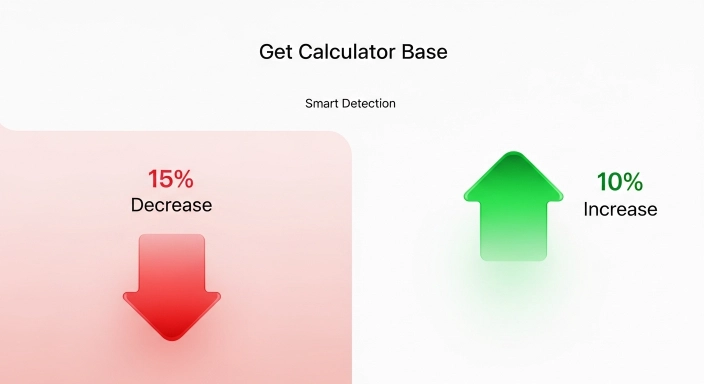
The Smart Detection Feature (Increase vs. Decrease): You do not have to select whether it is a hike or a drop. The code does it for you.
If the new value is lower, the tool shows a Red Badge (↓ Percentage Decrease).
If the new value is higher, the tool flips to a Green Badge (↑ Percentage Increase). It also provides a complete step-by-step breakdown so you can see exactly how the absolute value was divided.
The Percentage Decrease Formula: Mathematical Logic Explained
For those who want to know the logic running behind the scenes, here is the exact formula to reduce a number by a percentage or find the difference:
Percentage Change = ((Final Value - Initial Value) / |Initial Value|) × 100
Here is what happens inside the code:
First, we find the difference between the two numbers. Then, we divide that difference by the absolute value of the original number. Finally, we multiply the result by 100 to get the exact percentage.
Why the Starting Value Matters in % Reduction
Many people make the mistake of dividing by the new number. In math, your denominator must always be your starting point. If your salary drops from $5,000 to $4,000, the baseline is $5,000. If you calculate it the other way around, your relative decrease will be completely wrong.
Salary Increase Calculator: How to Calculate Your Next Pay Raise?
Since our tool automatically calculates upward trends too, it works perfectly as a salary increase calculator. When performance review season comes around, you need to know exactly where you stand.
Annual Salary Increase Calculator for Performance Reviews
If you are moving from a junior to a senior role, or simply getting an inflation adjustment, you need to calculate your salary calculator percentage increase. For example, if your gross salary was $60,000 and is now $66,000, just pop those numbers into our tool. It will show a 10% increase. This helps you understand your true earning power against the rising cost of living.
How to Calculate Salary Hike Percentage (New vs. Old Wage)
A lot of users ask: what is the formula for salary hike? It is the exact same engine. Take your new paycheck amount, subtract your old paycheck, divide by the old amount, and multiply by 100. Or, just let our pay raise calculator do the heavy lifting in one click.
Real-Life Use Cases: From Shopping Discounts to Weight Loss
You can use this tool for almost any daily life math problem.
Example 1: Calculating a 35% Discount on a $160 Item
Imagine you are at a store and see a jacket for $160, and it rings up as $104 at the register. What was the discount? If you put 160 as the initial and 104 as the final, our tool shows a 35% decrease. (Side note: If you ever need to calculate 10 percent off 160 manually, just move the decimal point one spot to the left: 16. Then subtract 16 from 160 to get 144).
Try it yourself using the “Apply a Percentage” mode above.
Example 2: Tracking Business Revenue Decline Year-over-Year
If you run a business in the UK, USA, or anywhere worldwide, tracking your revenue burn rate is critical. If your store made $10,000 last month and $7,000 this month, the tool will instantly show a 30% drop, helping you make fast financial decisions.
How to Calculate Cost Reduction Percentage (For Business & Procurement)
Businesses track cost reduction the same way as any percentage decrease — but usually across a budget line, a vendor contract, or an operating expense rather than a single item.
Example: A company’s monthly software spend was $12,000. After renegotiating contracts, it dropped to $9,500.
Cost reduction % = (12,000 − 9,500) ÷ 12,000 × 100 = 20.8% cost reduction
Enter the “before” figure as your Starting Value and the “after” figure as your Final Value above to get this instantly for your own numbers — whether it’s a procurement budget, a utility bill, or an operating expense.
Running a business that also tracks fuel or travel costs? Our Road Trip Planner and VAT Calculator can help with related expense planning.
Percentage Decrease in Excel: Formulas & Shortcuts
If you are managing massive payroll sheets or business inventory, you might need to do this in bulk.
Using the Formula to Reduce a Number by a Percentage in Excel
To decrease a number by a specific percentage in Excel, use this format: = Original_Cell * (1 - Percentage_Cell) For example, to decrease 40 by 10 percent fast in Excel, type =40*(1-0.10). The cell will instantly show 36.
This formula follows the standard percent-change calculation used in statistics and finance education — see Khan Academy’s percent word problems for additional worked examples if you want more practice.

What is the Difference Between Percentage Increase and Decrease?
A lot of users get confused between a percentage increase and a percentage decrease, especially when the numbers look similar. Here is the simple difference:
Percentage Increase (What happens when it goes up?): This means your new value is bigger than your starting value. For example, if your salary goes from $50,000 to $55,000, you gained money. The calculator will show a positive difference and highlight it in green. This is your growth, profit, or pay raise.
Percentage Decrease (What happens when it goes down?): This means your new value is smaller than your starting value. If a store drops a price from $50 to $40, you are saving money, but the item lost value. The calculator will show a negative difference and highlight it in red. This represents a discount, a pay cut, or a loss in weight.
The beauty of the GetCalcBase tool is that you do not need to choose which one you are doing. The tool looks at your final number and instantly tells you if you gained (↑) or lost (↓).
Recovery Math: Why a 10% Loss Needs an 11.1% Gain to Recover
Here is a pro tip that most people miss. If you take a pay cut or your stock portfolio drops, getting back to your original amount requires a bigger percentage increase than what you lost.
The GetCalcBase Bounce Back Table:
| The Drop (Percentage Decrease) | What You Need to Recover (Percentage Increase) |
| 10% Loss | 11.1% Gain |
| 20% Loss | 25.0% Gain |
| 25% Loss | 33.3% Gain |
| 50% Loss | 100% Gain (You have to double it!) |
If your $100 stock drops 50%, you now have $50. To get back to $100, that $50 has to grow by 100%. Keep this in mind when negotiating a salary after a previous pay cut.


Why GetCalcBase is the Best Choice for Worldwide Users?
I built GetCalcBase to be the most reliable utility platform on the internet. Whether you are calculating taxes in the USA, a salary hike in India, or business margins in Pakistan, the math holds up perfectly.
100% Private, Free, and No-Login Required Tools
Here is a quick look at why users trust our Precision Engine over others:
| Feature | GetCalcBase Tool | Other Generic Calculators |
| Data Privacy | 100% Client-Side (Nothing sent to servers) | Often tracks your data |
| Cost & Access | Always Free, No Sign-ups | Hidden behind paywalls or annoying logins |
| Step-by-Step Proof | Yes, shows the exact math breakdown | No, only shows the final number |
| Copy Result Button | Yes, 1-click copy to clipboard | Manual highlighting required |
My Pro Checklist for Tracking Percentage Changes:
- Always double-check your initial value. Mixing up new and old values is the #1 mistake.
- If you are calculating net pay, make sure you use after-tax numbers for both inputs.
- Bookmark this tool on your phone. It is fully mobile-responsive for quick store math.

Frequently Asked Questions (FAQs)
How do I calculate a 5% pay raise on my own?
Multiply your current salary by 0.05. Add that number to your current salary to get your new total.
Is a 10% annual raise better than a 10% monthly raise?
A 10% annual raise applied to your yearly salary equals the exact same money as a 10% monthly raise applied to your monthly paycheck. The math scales equally.
How to decrease 40 by 10 percent fast?
Find 10% of 40 (which is 4). Subtract 4 from 40. Your answer is 36.
Can a percentage decrease be more than 100%?
No, not in standard math. If you lose 100% of something, you have zero left. You cannot have less than zero physical items.
What happens if I get a negative percentage?
In our tool, if the math results in a negative percentage drop, the system automatically recognizes it as a Percentage Increase and highlights it in green for you.
How do I calculate a cost reduction percentage?
Subtract the new (reduced) cost from the original cost, divide by the original cost, then multiply by 100. For example, cutting a $5,000 expense to $4,000 is a 20% cost reduction. The calculator above does this instantly — just enter your original cost as the Starting Value and your new cost as the Final Value.
How do I calculate a pay cut or salary decrease?
Use the same formula as any percentage decrease: subtract your new salary from your old salary, divide by your old salary, and multiply by 100. This is different from calculating a raise — enter your old salary as the Starting Value and your reduced salary as the Final Value to see the exact percentage cut.
Conclusion: Mastering Percentage Changes for Better Financial Planning
Understanding how percentages work gives you a massive advantage, whether you are negotiating a new job offer, trying to understand your annual salary increase calculator results, or just trying to survive inflation. I designed this tool to remove the friction from everyday math. You don’t need a math degree; just plug in your numbers, copy the result, and get on with your day.
Expect new updates and fresh calculators on GetCalcBase every single week as we continue to build out our worldwide library.
Technical Note & Disclaimer
Disclaimer: The calculations provided by GetCalcBase are for informational and educational purposes only. While our Precision Engine v4.0 is built for maximum accuracy, always consult with a certified financial advisor or HR professional before making major career or financial decisions based on online calculations. Website developer Waseem Aijaz Linkedin
What the Get Calculator Base Community Says
Average Rating: 4.9/5 based on our beta users