
VAT & GST Calculator: Add or Remove Tax for Any Country (2026 Rates)
Quick Answer: Enter any amount and select your country to instantly add or remove VAT/GST — supports UK, Pakistan, UAE, India, and 160+ countries with 2026 rates pre-loaded. Switch between “Add Tax” and “Remove Tax” modes for reverse calculations.
Dealing with taxes like VAT or GST can feel like a headache, especially when you are trying to manage invoices for different countries. I know how frustrating it is to realize you’ve calculated the tax wrong after sending an invoice. That is why I developed the Global VAT & GST Calculator at GetCalcBase.
Global VAT & GST Calculator
Recent Calculations
| Country | Net Amount | Tax Value | Total | Action |
|---|
Whether you are a freelancer in the UK, a business owner in Pakistan, or an online seller in New Zealand, this tool provides instant, accurate results so you can focus on growing your business instead of doing manual math.
Important Note Before You Use This Tool:
This calculator is designed for quick, accurate VAT and GST estimates — useful for invoicing, pricing, and learning how tax systems work globally. It is not a substitute for professional tax advice.
Tax laws change frequently and vary by industry, product type, and business structure within each country. For official tax filings, always verify rates with your local tax authority (HMRC for the UK, FBR for Pakistan, ATO for Australia) or consult a qualified accountant.
Let me tell you one more thing.
Let me tell you one more thing. All our tools are different from each other, and each one has its own concept and story behind it.
This tool is different because I did not have any personal experience or background story related to it. The main reason for building it was that many people do not clearly understand what GST and VAT are, how they work, or how they differ from country to country.
Some countries have GST, while others have VAT. The rates and rules can also differ.
That is why I have included different countries in this tool and will continue adding more. I have made it simple and easy to use so anyone can use it.
You only need to enter your amount, select your country, and enter the tax percentage. Based on your information, the tool will calculate the tax and total amount for you.
It is very simple to use. You can also tell us which country you are from so we can add more features and information according to the needs of people in that country.
Here is a tip from me:
Here is a tip from me: This tool is made to help solve problems, but it is only for educational purposes and is not real advice.
You can also enter a custom interest rate, such as the rate you get from your own country, and add it to the tool to calculate the results.
💡 My Expert Pro-Tips & Checklist: Are You Ready to Register for VAT/GST?
- Has your turnover crossed the local threshold (e.g., £90k in the UK)?
- Are you selling to B2B clients who prefer VAT invoices?
- Do you have a system to keep digital records for at least 6 years?
- Have you checked if your products fall under "Zero-Rated" or "Exempt" categories?
The Reverse Tax Trap: Never just subtract 18% from a final price to find the original. Always use the “Remove Tax” mode in our tool to ensure your base price and tax amount match perfectly for your accounting records.
Who Uses This Tool
Three groups find this calculator most useful:
Freelancers and small business owners billing international clients — specifically for understanding whether to add VAT or GST to an invoice, and at what rate, depending on where the client is based. The country selector with pre-loaded 2026 rates eliminates the need to manually look up each country’s standard rate.
Ecommerce sellers calculating final product prices inclusive of tax. The “Add Tax” mode gives the gross amount a customer pays. The “Remove Tax” mode reverses a total price to find the original net amount — useful when a supplier invoice includes tax and you need the pre-tax figure for your records.
Students and professionals learning tax systems — the side-by-side comparison of how VAT works in the UK (20%), UAE (5%), Pakistan (18%), and Australia (10%) is one of the clearest ways to understand that the tax name (VAT vs GST) changes by country but the underlying math is identical.
The history log in the tool saves your recent calculations within the session — useful when you are batch-processing multiple invoices and need to compare different amounts without losing your place.
Expert Tips for Better Financial Management
Always verify the Tax Point: The tax is due based on the invoice date, not the payment date. Keep your invoicing current.
Use the History Log: I included a history feature so you can batch-calculate multiple expenses without losing your place.
Keep your “Input” vs. “Output” separate: Always use this tool to calculate your Output (collected tax) and your Input (paid tax) to determine your final liability before filing.
A Note from the Developer: > “In my experience as a developer, the biggest mistake users make is trying to subtract a percentage from a total (e.g., $118 – 18\%$). That is mathematically wrong. My tool uses the correct division method ($118 / 1.18$) to ensure your profit margins remain protected.” — Waseem Aijaz, and Lead Developer.
How to Use This VAT Calculation Calculator? (Step-by-Step Guide)
Using our tool is simple and fast. Since I built this with a clean interface, you don’t need to be an accountant to get it right. Here is how it works:
Enter the Amount: Type the total price or the base amount in the “Amount” box.
Select Your Country: Choose your location (e.g., Pakistan, UK, UAE). The tool automatically loads the latest 2026 tax rates for that region.
Pick the Tax Rate: Select the percentage that applies to your product. If your rate isn’t listed, choose “Custom” and type it in manually.
Choose Mode: * Select “Add Tax” if you have the price without tax and want to see the final total.
Select “Remove Tax” if you have the total price and want to see the original price before tax.
Calculate & Save: Click the button to see your result. The best part? Your recent calculations are saved in a history log below so you don’t lose track!
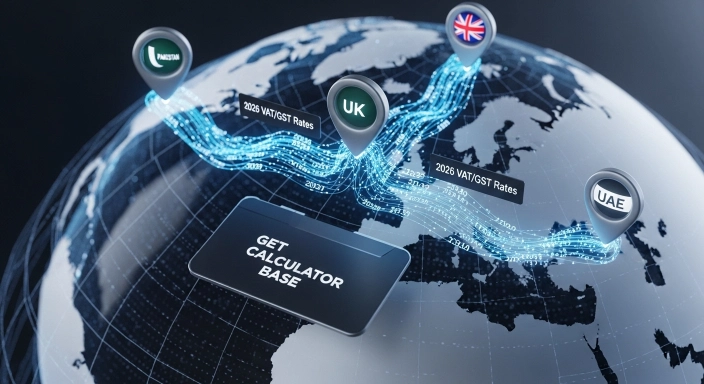
My Personal Insight: VAT vs. GST: While the names differ by region (VAT in the UAE, GST in Pakistan), the logic is identical. I’ve programmed the country selector to automatically load the correct regional labels and latest 2026 rates so you don’t have to look them up.
What is Value Added Tax (VAT) and How Does It Work Globally?
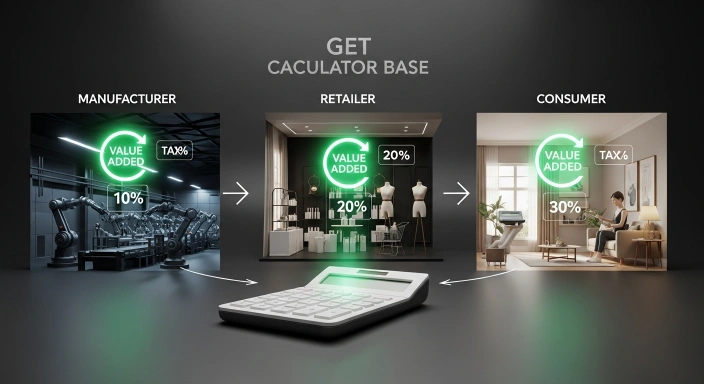
Value Added Tax (VAT) is a consumption tax placed on a product whenever value is added at any stage of the supply chain. From the manufacturer to the retailer and finally to the customer, everyone plays a part. However, it is the end consumer who ultimately pays the tax.
Globally, more than 160 countries use VAT or its sibling, GST (Goods and Services Tax). While the names change, the logic remains the same: it’s an indirect tax collected by businesses on behalf of the government.
VAT vs. GST: Is There a Difference or Just a Name Change?
Actually, for most business owners, they are practically the same.
VAT is the term used in the UK, Europe, and the Middle East.
GST is preferred in Australia, New Zealand, Canada, India, and Pakistan.
Both are multi-stage taxes. The main difference lies in specific local regulations and the “slabs” (rates) set by different tax authorities like the FBR in Pakistan or HMRC in the UK.
For Australia-specific GST rules, the Australian Taxation Office’s official GST guide is the authoritative source — this calculator handles the math instantly using the same underlying formula.
Deep-Dive Tax Concepts
Input VAT vs. Output VAT: A simple explanation of what you pay vs. what you collect.
The “Tax Point” (Time of Supply): Why the date on the invoice matters for your tax return.
Reverse Charge Mechanism: A brief note on how tax works when buying services from abroad.
Interactive Elements
Checklist for VAT Registration: A small 5-step checklist to help users decide if they need to register yet.
Visual Formula Breakdown: Instead of just text, a simple table or box showing the “Math at a Glance
Regional Specifics
Pakistan Provincial Sales Tax (PRA, SRB, etc.): A small note that services in Pakistan have different rates (13%-16%) depending on the province.
UK Making Tax Digital (MTD): Mention that businesses must use functional compatible software for HMRC.
Understanding Input vs. Output VAT
Input Tax: The VAT you pay when buying things for your business (can usually be reclaimed).
Output Tax: The VAT you charge your customers (must be paid to the government). Our calculator helps you track both instantly.
Technical Value & Trust
The Technology Behind the Tool: Briefly mention that it uses JavaScript for real-time calculations (no page reload) and secure local storage for the history log.
Precision & Rounding Rules: Explain how the tool handles decimal points (rounding to 2 digits) to match accounting standards.
A Note From the Developer
I’m Waseem Aijaz. I built this to handle both VAT and GST in one tool because most calculators online only support one system — but businesses working across UK/EU and Pakistan/India/Australia constantly need both, and the underlying math is identical either way.
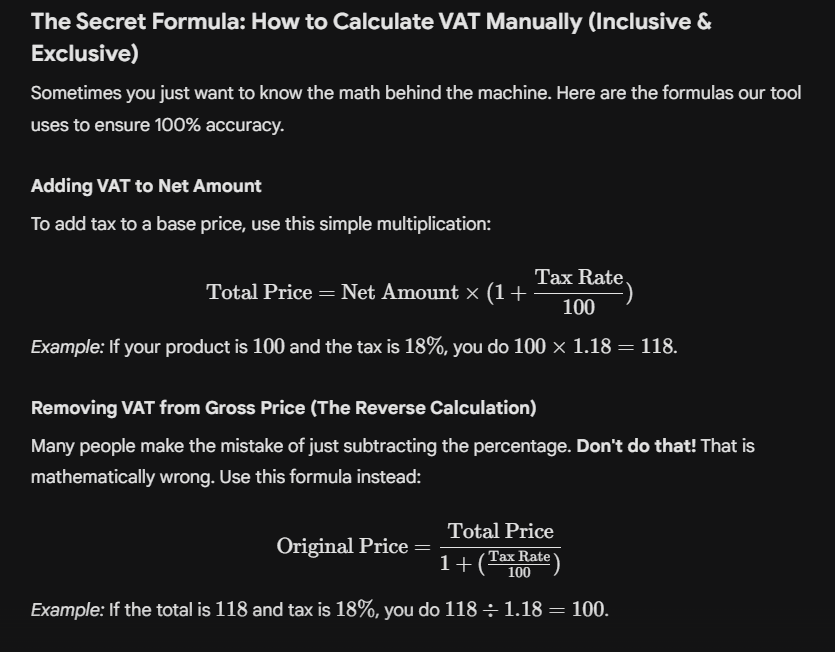
The Secret Formula: How to Calculate VAT Manually (Inclusive & Exclusive)
At GetCalcBase, we believe that transparency is the key to trust. When you use our Global VAT & GST Calculator, you aren’t just getting a number—you are getting a precise mathematical calculation based on industry-standard accounting formulas.
The Math We Use
To ensure your invoices and financial records are always accurate, our calculator utilizes two primary logic flows based on whether you are adding or removing tax.
1. Adding Tax (Exclusive to Inclusive)
If you are starting with a base price (Net Amount) and need to calculate the final price (Gross Amount) including the tax rate (e.g., 18% GST or 20% VAT):
Final Price Formula:
$$\text{Gross Amount} = \text{Net Amount} \times \left(1 + \frac{\text{Rate}}{100}\right)$$Tax Value Formula:
$$\text{Tax Amount} = \text{Gross Amount} – \text{Net Amount}$$
2. Removing Tax (Inclusive to Exclusive)
If you have a total price (Gross Amount) and need to back-calculate the original net price (e.g., to see how much tax you can claim back):
Original Price Formula:
$$\text{Net Amount} = \frac{\text{Gross Amount}}{1 + \left(\frac{\text{Rate}}{100}\right)}$$Tax Value Formula:
$$\text{Tax Amount} = \text{Gross Amount} – \text{Net Amount}$$
Why Professionals Trust This Tool
I built this tool to solve the common problems that bankers, business owners, and digital professionals face daily. Whether you are reconciling a bank statement or preparing a B2B invoice, this calculator provides:
Real-time Accuracy: Built with precision-first JavaScript, ensuring no rounding errors.
Privacy-Focused: All calculations happen locally in your browser. Your sensitive financial data is never uploaded to a server.
2026 Ready: We continuously monitor global tax updates, including FBR, HMRC, and ATO rate changes.
Taxes are only one part of running an online store. Marketplace fees can also reduce your final income if they are not included during pricing. Before calculating VAT or GST, estimate your expected Etsy selling fees with our Etsy Calculator so you can build more accurate pricing strategies and avoid unexpected deductions.
Global Tax Cheat Sheet: VAT & GST Rates in 2026
Tax rates change frequently. Here is a quick comparison of current standard rates globally:
| Country | Tax Type | Standard Rate (2026) |
| United Kingdom | VAT | 20% |
| Pakistan | GST | 18% |
| United Arab Emirates | VAT | 5% |
| New Zealand | GST | 15% |
| Australia | GST | 10% |
| Saudi Arabia | VAT | 15% |
7 Expert Tips to Optimize Your VAT Reclaims and Save Money
Keep Every Receipt: Even small purchases add up. If you don’t have the invoice, you can’t reclaim the tax.
Separate Bank Accounts: Keep your collected tax in a separate savings account so you aren’t surprised when the tax bill arrives.
Check Registration Thresholds: In the UK, the threshold is £90,000. In Pakistan, it’s Rs. 10 million for most. Don’t register too early if it hurts your pricing.
Use Cash Accounting: If your industry has slow-paying clients, only pay tax to the government when you actually receive the cash.
Verify Supplier VAT Numbers: Before paying a large invoice, verify the supplier’s tax ID on official government portals.
Claim Pre-registration Tax: Did you know you can often claim tax back on goods bought before you registered? Check your local rules!
Watch the Deadlines: Late filing penalties are expensive and completely avoidable with a simple calendar reminder.
Pro-Tips:
Cash Accounting Strategy: If you’re a developer or service provider with slow-paying clients, I highly recommend the Cash Accounting method. It ensures you only owe the government tax on money you’ve actually received, preventing you from paying tax out of your own pocket.

Common Mistakes Small Businesses Make During VAT Calculation
- ubtracting % instead of Dividing: As shown in the formula section, subtracting 20% from a total is not the same as removing 20% VAT.
- Mixing Zero-Rated and Exempt: Zero-rated goods are still in the VAT system (you can reclaim costs), but Exempt goods are outside it (you can't reclaim costs).
- Forgetting International Rules: Selling digital goods to another country often requires you to follow their tax rates, not yours.
Why Choose GetCalcBase for Your Tax Calculations?
- At GetCalcBase, we believe tools should be free, fast, and private.
- No Login Required: We don't ask for your email. Just calculate and go.
- History Feature: Our tool keeps a temporary log of your session so you can compare multiple invoices easily.
- Mobile Friendly: Whether you are at your desk or on a construction site, the calculator works perfectly on your phone.
- Regular Updates: We update our rates every month to ensure compliance with 2026 tax laws.
Frequently Asked Questions (FAQs)
What does VAT mean?
VAT stands for Value Added Tax — a consumption tax added at each stage of production or sale, ultimately paid by the end consumer. It’s used by 160+ countries (called GST in some, like Pakistan, India, and Australia), though the exact rate and rules vary significantly by country.
What is the difference between 0% VAT and VAT Exempt?
Zero-rated goods are still part of the VAT system — the rate is 0%, but businesses can still reclaim VAT paid on related costs. Exempt goods are completely outside the VAT system — no VAT is charged, but businesses also cannot reclaim VAT on associated costs. This distinction matters for what you can claim back.
How do I calculate VAT in reverse (from a total price)?
Divide the gross (total including tax) by (1 + tax rate as a decimal). For example, to find the pre-tax price from a £120 total at 20% VAT: £120 ÷ 1.20 = £100 net, with £20 VAT. Never subtract the percentage directly from the total — that gives the wrong answer. The “Remove Tax” mode in this calculator does this correctly automatically.
Does this calculator support the 18% GST rate for Pakistan?
Yes! The tool is updated with the current FBR standard rate of 18% for Pakistan.
Can I use this tool for international B2B invoices?
Absolutely. You can use the “Custom Rate” feature to match any international tax requirement.
What is the penalty for incorrect VAT calculation?
Penalties vary by country but usually involve a percentage of the unpaid tax plus interest. Using an accurate calculator helps mitigate this risk.
Real-World Business Scenarios (User Intent)
Pricing a New Product: How to set a price that includes profit + VAT.
Invoicing International Clients: Managing B2B vs B2C tax rules.
Reconciling Supplier Invoices: Checking if the VAT charged to you is correct.
Financial logic verified by Zainab Sarfraz Financial Logic Expert.
Conclusion: Simplify Your Tax Life Today
Precision is the key to business success. Small errors in tax calculation can lead to huge financial losses or legal trouble. With the GetCalcBase VAT calculation calculator, you get the accuracy of an accountant with the speed of a digital tool.
Try it now and see how easy managing your business finances can be!
Important Disclaimer
Financial Information Purposes Only This calculator is designed to provide quick, reliable estimates for bankers, businessmen, freelancers, and digital professionals. While we strive for mathematical accuracy based on the latest 2026 tax standards, tax laws vary significantly by industry, region, and entity type. We strongly recommend consulting with a certified tax consultant or chartered accountant before filing official government tax returns. GetCalcBase assumes no responsibility for financial discrepancies resulting from the use of this tool.
Complete Your Business Finance Toolkit
VAT is rarely the only number small business owners need to track. If you sell internationally, our Currency Exchange Converter helps you price products accurately across borders. Running an Etsy shop or similar marketplace? Our Etsy Calculator factors in fees alongside your tax obligations. And once tax season rolls around, our Income Tax Calculator 2026 picks up right where this VAT calculation leaves off.
What the Get Calculator Base Community Says
Average Rating: 4.9/5 based on our beta users