

Why Your 1TB SSD Shows 931GB & How to Calculate 8K Video Space
This is my tip from experience.
If you are reading this article, don’t just stop at information—there is also a useful tool called the Data Storage Calculator. It helps you understand storage units like KB, MB, GB, and TB in a very simple way.
Under each result, you also get an Expert Tip, which makes it easier to understand real-world usage of data storage and conversions. This helps you learn faster and apply it in practical situations.
So read the article, understand the concept, and then use the tool to get better clarity and a learning experience.
Have you ever unboxed a premium 1TB NVMe SSD, plugged it into your Windows rig, and felt that instant sting of disappointment when it only shows 931GB? As a developer who spends all day looking at raw sectors and file systems, I get this question more than any other.
It feels like you’ve been shortchanged, but the reality is a fascinating dive into how computers “think” versus how humans “sell.” To help you navigate this, I’ve integrated a professional data storage calculator logic into our platform so you never have to guess your actual capacity again.

The Invisible Gap: Decimal vs. Binary Explained
The core of the problem lies in two different languages of measurement: Decimal and Binary.
Manufacturers (the marketing teams) use the Decimal system (Base-10). To them, $1 \text{ Kilobyte} = 1,000 \text{ Bytes}$. It’s clean, it’s simple, and it makes the numbers on the box look huge. However, your Operating System (Windows or Linux) is a mathematical purist; it uses the Binary system (Base-2), where $1 \text{ Kibibyte} = 1,024 \text{ Bytes}$.
When you buy a “1TB” drive, you are getting exactly $1,000,000,000,000$ bytes. But Windows divides that number by 1,024 three times to find the Gigabytes.
- $1,000,000,000,000 / (1024 \times 1024 \times 1024) = 931.32 \text{ GB}$.
This is exactly why I built our Data Storage Converter—to show you the raw truth behind the marketing hype.
Quick Comparison: Storage Marketing vs. Reality
Understanding the math is easier when you see the numbers side-by-side. Our internal data storage calculator uses these exact ratios:
| Unit Level | Marketing (SI/Decimal) | System (IEC/Binary) | The Difference (Loss) |
| 100 GB | 100,000,000,000 Bytes | ~93.13 GiB | ~6.8% |
| 500 GB | 500,000,000,000 Bytes | ~465.66 GiB | ~6.9% |
| 1 TB | 1,000,000,000,000 Bytes | ~931.32 GiB | ~7.0% |
| 2 TB | 2,000,000,000,000 Bytes | ~1,862.65 GiB | ~7.1% |
Pro Challenge: Calculating 8K Video Storage for YouTubers
If you are a video editor or a YouTuber moving into 8K production, the “1024 vs 1000” debate isn’t just a curiosity—it’s a budget-breaker.
8K RAW footage can consume upwards of 120GB to 150GB per minute depending on your bitrate and codec. If you calculate your storage needs using the manufacturer’s “1000-byte” logic, you will run out of space mid-render. For long-form projects, you aren’t just looking at Terabytes; you are looking at the edge of Petabytes.

Expert Example:
If you have 1 hour of 8K footage at a bitrate that totals 8TB, Windows will actually need roughly 7.45 TiB of real binary space. If you don’t use a precise data storage calculator, you might buy an 8TB drive and find out your project won’t fit because of the formatting overhead.
Key Features of Our Data Storage Logic
When I developed the data storage calculator at GetCalcBase, I made sure to include features that pros actually need:
- Dual-Standard Support: Toggle between SI (1000) and IEC (1024) effortlessly.
- Bit-to-Petabyte Scaling: From tiny metadata bits to massive cloud-level Petabytes.
- Zero Latency: Built with client-side JavaScript for hardware-level speed.
- Privacy-First: Your sensitive file sizes are never uploaded to a server.
Building Your Tech Stack with GetCalcBase
As we expand our Developer Tools, our goal is to provide utilities that speak the language of engineers. For instance, when you aren’t calculating disk sectors, you’re likely securing your servers. In that case, our Best Free Password Generator uses the same high-level cryptographic logic as our storage tools.
For those of you on the business side, we’ve built a suite of Digital Marketing Tools. If you’re managing massive outreach, our Bulk Email Address Generator is a lifesaver, and you can track your performance precisely with our CTR Calculator.
Why Every Expert Needs a Data Storage Calculator
In 2026, data is getting “heavier.” With AI models and ultra-high-res textures, “eyeballing” your storage is a recipe for disaster. Using a dedicated data storage calculator allows you to:
- Avoid Server Downtime: Never let a log file crash your VPS.
- Budget Accurately: Buy the right number of drives for your RAID array.
- Audit Your Hardware: Ensure your cloud provider is actually giving you the space you paid for.
Whether you are exploring our Education Tools or using our Finance Tools to calculate the ROI of your new server rack, accuracy is the base of everything we do.

Frequently Asked Questions (Storage FAQs)
Why is 1TB actually 931GB?
This happens because manufacturers use a Decimal system ($1000^3$) while Windows uses a Binary system ($1024^3$). Our data storage calculator shows that the “missing” 70GB is just a difference in mathematical measurement.
What is the difference between a Megabyte (MB) and a Mebibyte (MiB)?
An MB is 1,000,000 bytes (Decimal), while a MiB is 1,048,576 bytes (Binary). For technical server configurations, always use the binary value from a data storage calculator.
Does formatting a drive reduce its capacity?
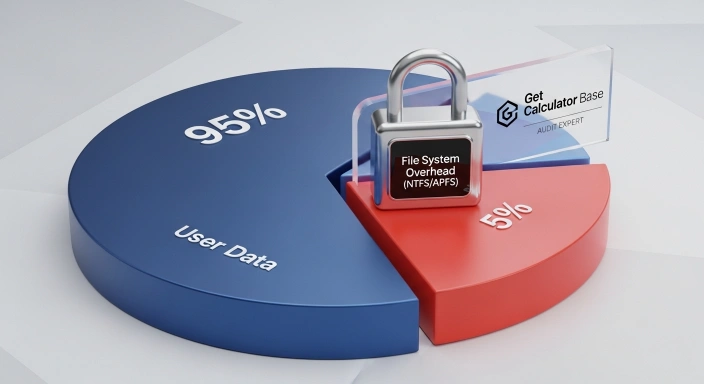
Yes. File systems like NTFS or APFS require “overhead” space for the Master File Table (MFT) and indexing. This is why a data storage calculator result should always include a 5% safety buffer.
How much 8K video can fit on a 1TB SSD?
On average, you can fit about 7 to 8 minutes of 8K RAW footage per TB. However, always use a data storage calculator to match your specific camera’s bitrate.
Final Thought: Stop Guessing, Start Calculating
The “missing” space on your SSD isn’t gone; it’s just being measured by a different ruler. Stop letting marketing numbers dictate your workflow. Use our Data Storage Converter to check your real capacity.
By mastering the data storage calculator logic, you move from being a casual user to a technical power-user who knows exactly what’s happening under the hood of their machine.