

Here is a tip from me: if you are searching for a domain, in my opinion, you should stay on the “All” setting so you can see results for every category. However, if you want to track a specific one, you can select it as well.
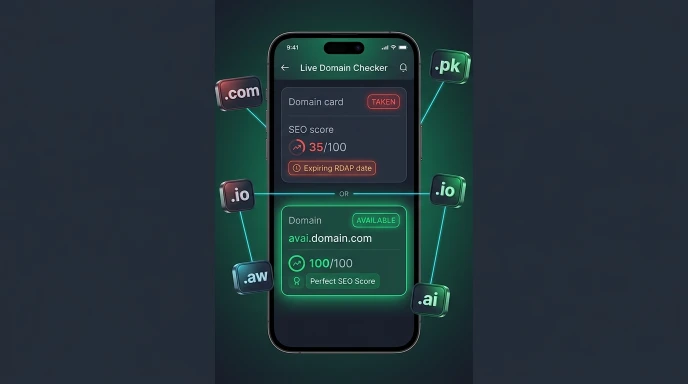
My best tip is this: the tool also shows you domains that are currently unavailable. You can use the filter to check them, see when they are set to expire, and find out when they might be available for purchase. You will get a lot of information that will be a huge help if you are planning to place a bid on a domain. This feature has received fantastic reviews from users!
A domain doesn’t disappear the moment it’s registered — it runs on a renewal cycle, and if that renewal lapses, the domain eventually becomes available again. The tricky part is knowing when that might happen for a specific domain you’re watching, since expiry dates aren’t something most sites advertise.
A domain expiry checker solves exactly this — it looks up the current registration data for a domain and tells you exactly when its registration period ends, whether it’s a domain you own and want to track, or one you don’t own but are hoping might eventually come free.
Why Expiry Dates Matter for More Than Just Your Own Domain
Most people think of expiry checking as something you only do for domains you already own, to avoid an accidental lapse. That’s true, but it’s only half the picture. Expiry dates are equally useful for domains you don’t own — if there’s a name you want that’s currently taken but shows no signs of active use, its expiry date tells you whether it’s worth quietly monitoring rather than assuming it’s gone for good.
Domains that lapse without renewal typically go through a grace period before becoming available again, so knowing the expiry date gives you a realistic timeline rather than an indefinite guess.
My Experience Watching a Domain Come Free
A few years back, I had my eye on a short, brandable domain that was registered but clearly unused — no site, no hosting I could detect. Rather than giving up or trying to track down the owner for an offer, I checked the expiry date and simply made a note to check back a few weeks after it passed. Sure enough, the domain lapsed and became available again without ever needing an outreach attempt or negotiation. It’s not a strategy that works for every domain — plenty of taken names are actively renewed indefinitely — but for genuinely dormant ones, patience paired with the right expiry date is often more effective than chasing the owner directly.
What a Domain Expiry Checker Actually Tells You
- Registration date — when the domain was first registered, giving you a sense of its overall age and history.
- Expiry date — when the current registration period ends, which is the key number for tracking a lapse.
- Registrar — the company managing the domain, useful context if you’re deciding whether to reach out directly instead of waiting.
- Hosting status — whether the domain currently has active infrastructure behind it, which helps you judge whether it’s genuinely dormant or quietly in use.

How to Check a Domain’s Expiry Date (Step by Step)
- Enter the full domain name, including its extension, into a domain lookup tool.
- Locate the expiry date in the results. This is typically shown alongside the registration date and registrar information.
- Cross-check with the hosting detection. A domain with an approaching expiry date and no active hosting is a strong candidate for becoming available; one with active hosting is very likely being renewed as usual.
- Set a personal reminder if you’re watching it. Domain expiry checkers show a snapshot at the time of your search — for domains you’re actively tracking, checking back periodically as the date approaches is more reliable than checking once and assuming nothing changes.
- Recheck shortly after the expiry date passes, since most registries include a grace period before a lapsed domain is fully released back onto the open market.
Our own domain name search tool includes expiry date lookup as part of its standard results — expanding any taken domain’s result card shows its registration date, expiry date, registrar, and hosting status together, without needing a separate expiry-specific tool.

Understanding the Domain Lapse Timeline
Most domains don’t simply vanish and reappear the instant they expire. The general pattern looks like this:
| Stage | What Typically Happens |
|---|---|
| Expiry date passes | Domain enters a renewal grace period, often 30–45 days |
| Grace period ends | Domain may enter a redemption period with an additional fee for the original owner to reclaim it |
| Redemption period ends | Domain is released and becomes available for new registration |
Exact timelines vary by registry and extension, so treat this as a general pattern rather than a fixed rule for every domain.
Common Mistakes When Checking Domain Expiry
- Checking once and forgetting about it. Expiry dates are a snapshot — for a domain you’re actively watching, a single check months in advance doesn’t guarantee the date won’t be renewed before you look again.
- Assuming expiry means immediate availability. The grace and redemption periods mean there’s often a real delay between the expiry date and the domain actually becoming registerable again.
- Ignoring hosting status entirely. A domain nearing expiry with active hosting behind it is very likely being renewed on schedule, not lapsing.
- Confusing registration date with expiry date. These are two different data points — registration date tells you how old a domain is, expiry date tells you when the current cycle ends.
- Not accounting for auto-renewal. Many domain owners have auto-renewal enabled through their registrar, meaning an approaching expiry date doesn’t necessarily signal an upcoming lapse at all.
Checklist for Tracking a Domain’s Expiry
- Full domain name and extension checked correctly
- Both registration date and expiry date noted, not just one
- Hosting status reviewed to judge whether renewal is likely
- Reminder set to recheck as the expiry date approaches, rather than a single one-time look
- Awareness that a grace and redemption period likely follows the expiry date before actual availability
Expert Tips for Domain Expiry Monitoring
- Focus your monitoring on domains with no active hosting. An expiry date on a domain that’s clearly in use is far less meaningful than one on a domain that looks abandoned.
- Build in a buffer after the expiry date before assuming a domain is available, since grace and redemption periods commonly add several weeks to the real timeline.
- Check registrar-specific policies if you’re serious about a particular domain, since grace period lengths can vary between registries and top-level domains.
- Don’t rely on memory for long monitoring windows. If you’re tracking a domain over several months, a periodic scheduled check is far more reliable than trying to remember an exact date.
Frequently Asked Questions
Is a domain expiry checker free to use? Yes, checking a domain’s registration and expiry dates through public lookup data doesn’t require any payment or account.
Does a domain become available the exact day it expires? Rarely. Most registries include a grace period, often followed by a redemption period, before a lapsed domain is actually released for new registration.
Can I check the expiry date of a domain I don’t own? Yes, expiry date information is part of the public registration data for any domain, regardless of who owns it.
Why does a domain near its expiry date sometimes just get renewed? Many domain owners have auto-renewal enabled through their registrar, so an approaching expiry date doesn’t necessarily mean the domain is being let go.
How do I know if a domain is actually going to lapse versus just approaching a routine renewal? Checking whether the domain has active hosting is the clearest signal — domains with no detectable hosting and no visible content are more likely to lapse than actively used ones.
Is there a set grace period that applies to every domain? No, grace and redemption period lengths vary by registry and top-level domain, so it’s worth treating any specific number as an estimate rather than a universal rule.
Conclusion
A domain expiry checker turns an uncertain waiting game into an informed one — whether you’re protecting your own domain from an accidental lapse or watching a taken name you’d like to eventually register. Knowing the registration date, expiry date, and hosting status together gives you a realistic read on what’s actually likely to happen next.
You can check all of this directly using our domain name search tool, which shows registration and expiry data alongside hosting detection for any domain you look up. If you’re also managing your own site’s performance, our image load time calculator can help make sure your pages load quickly, and a strong password from our password generator is worth setting up alongside any domain renewal. You can also try the domain name search tool directly, or run a broader check with our free SEO on-page checker once your domain is set up.
Article reviewed by Waseem Aijaz, WordPress developer and SEO specialist.